Information – Technology +
Ex-Google workers launch ‘Cuil’ search engine
Ex-Google workers launch ‘Cuil’ search engine
Agencies Published: July 29, 2008, 10:29
San Francisco: A group of former Google engineers have launched a rival Internet search engine Cuil this week, calling it an improved version of the world’s most popular web-scouring tool.
Cuil’s founders include former Google staffer Anna Patterson. Patterson intends to upstage Google, which she quit in 2006 to develop a more comprehensive and efficient way to scour the Internet.
The end result is Cuil, pronounced “cool.” Backed by $33 million in venture capital, the search engine began processing requests for the first time on Monday.
Cuil had kept a low profile while Patterson, her husband, Tom Costello, and two other former Google engineers — Russell Power and Louis Monier — searched for better ways to search.
Cuil’s search index spans 120 billion Web pages. Patterson believes that’s at least three times the size of Google’s index, although there is no way to know for certain. Google stopped publicly quantifying its index’s breadth nearly three years ago when the catalog spanned 8.2 billion Web pages.
Cuil won’t divulge the formula it has developed to cover a wider swath of the Web with far fewer computers than Google. And Google isn’t ceding the point: Spokeswoman Katie Watson said her company still believes its index is the largest.
After getting inquiries about Cuil, Google asserted on its blog Friday that it regularly scans through 1 trillion unique Web links. But Google said it doesn’t index them all because they either point to similar content or would diminish the quality of its search results in some other way. The posting didn’t quantify the size of Google’s index.
A search index’s scope is important because information, pictures and content can’t be found unless they’re stored in a database. But Cuil believes it will outshine Google in several other ways, including its method for identifying and displaying pertinent results.
You can convert PC to an HDTV
You can convert PC to an HDTV
Monday July 14 2008 16:36 IST
So you’re sitting around, totally bored with the same old PC, bored with word processing, bored with spreadsheets, bored with Web browsing, bored with music, bored with news, bored with grainy YouTube videos.
Then you realise it’s Sunday night, and it strikes you: What you really want to do is watch Desperate Housewives on your computer. In HD. Well, for a hundred bucks, you can satisfy that high-definition craving with the Pinnacle PCTV HD Pro Stick.
Plug this nifty little gadget into a USB port on your computer, hook up an antenna or cable feed to the other end and you’re in business — HDTV in a window on your desktop, or full-screen if you prefer.
The software bundle includes a digital video recorder(DVR) so you can record your favourite shows while you’re not there. There’s even a tiny remote control so you can watch without getting out of your chair.
The Pro Stick also has an intriguing feature whose existence I was only vaguely aware of before this. It’s a circuit called a QAM tuner, which brings in unscrambled digital broadcasts, including some in high-definition, directly from a cable company feed — without a cable box, high-def or otherwise. QAM is also built into most new digital sets.
You won’t get your cable company’s whole digital menu, most of which is scrambled unless you rent a digital box. But you’ll generally see the same digital channels you’d pick up with an antenna, without the vagaries of digital reception over-the-air. You may even pick up some video-on-demand channels if someone in your neighborhood is watching them.
First things first — there’s only so much TV you can expect from a hundred-dollar PC gadget. The Pro Stick generally delivers what it promises, but there’s no way a picture processed through software by a PC and displayed on a monitor that’s not optimised for television is going to look as good as it would on a stand-alone HDTV set — or on even a monitor driven by an internal PC tuner.
Still, the quality was fine for casual, close-up viewing — better than analog TV tuner cards I’ve tried in the past. For that reason, the Pro Stick is a cheap and efficient way to turn a student’s laptop into a dorm room entertainment centre.
The Pro Stick is a black box about the size of your thumb, and about twice the volume of a flash memory drive. It can plug directly into a USB 2.0 port, but a short, bundled extension cable gives it more flexibility. The other end of the tuner sports a standard coaxial connector for an antenna or cable feed.
Rounding out the package are the small remote control, a monopole antenna for direct, over-the-air tuning, audiovisual cables to pull an analog signal directly from a set-top cable box, and two software CDs. To process HDTV, you’ll need reasonably up-to-date hardware.
The minimum requirement is a Pentium 4 processor running at 2.8 GHz or better, a gigabyte of memory, Windows XP or Vista, and at least 20 gigabytes of free hard drive space if you want to record programmes.
Most new dual-core, Intel or AMD processors should have no trouble with it.Setup was easy. I installed Pinnacle’s TVCenter Pro software, connected the tuner to the antenna and started the programme.
TVCenter displays the picture in a resizable window, changes channels and serves as a front end to the programme guide and DVR. I had TVCenter scan for both analog and digital channels, as well as FM radio stations and Internet radio sites.
The device includes both NTSC (analog) and ATSC (digital) tuners. The TV center displayed a crisp, clear picture on a 17-inch Dell LCD monitor — particularly with digital channels, which is not surprising, since that’s one of their advantages. Like most displays designed for computers, its default settings weren’t jacked up as high as a typical TV set.
When I switched to the Comcast cable feed in my home office, the HDTV Pro Stick took about 20 minutes to search for channels and turned up several hundred of them — most of which turned out to be scrambled digital signals that require a box for decoding.
But unscrambled digital signals from local broadcast outlets were there. The quality of the hard drive playback was good, although it’s hard to compare with the real thing. Just make sure you have plenty of hard drive space if you like to keep recordings for a while.
For more info, visit http://www.pinnaclesys.com
Self-service bag check-in at airport
Self-service bag check-in at airport
7 Jul 2008, 0000 hrs IST,REUTERS
AMSTERDAM: Passengers departing from Amsterdam airport can now cut waiting times and minimize human contact by using a machine to check in their luggage.
Schiphol airport launched a trial with Dutch airline KLM on Friday that allows passengers who have checked in via a self-service kiosk or on the internet to drop off their luggage at a machine. The six-month trial is the first to be undertaken by any airport in the world, a KLM spokeswoman said.
Passengers place their luggage into a large, white machine, scan their boarding pass and answer the usual security questions via a touch-screen. The machine weighs the luggage and prints out a label that passengers attach to their suitcase.
The luggage will be subjected to the same security screening as bags checked in at the regular counter.
An employee will check passports during the trial to make sure that the luggage belongs to the passenger, but future machines will have the capability to scan passports as current self-service kiosks already do, the spokeswoman said.
Faced with increasing numbers of passengers, the Schiphol airport has been working towards the self-service baggage checks for two years.
Bluetooth to the rescue

Bluetooth to the rescue
By Inam Abidi Amrohvi for GULF NEWS Published: June 15, 2008
Inam Abidi Amrohvi helps you pick the right wireless headset
Mobile phones have become an essential part of our lives. Businesses rely on them as much as they do on email. There are two issues, though, that must be addressed. One is obviously the battery. Although the average talk time across most models has improved considerably, it remains a problem, especially with smart phones. A possible solution is to carry an extra battery.
The other issue is its use while driving. You could use headphones, but using them is a pain; the wires get tangled most of the time. It’s here that the Bluetooth comes to the rescue.
Wired vs. wireless headsets
In simple terms Bluetooth is a short-range communications technology which does away with the need for wires. This wireless technology takes advantage of a 2.4GHz frequency to make it globally compatible. Using a wired headset is a cheaper option if you don’t mind wires hanging down from your ears. Bluetooth headsets on the other hand normally use only one ear.
And you need press just one button for calls. The headset needs to be charged, with the charge lasting a day or two depending on usage.
With advances in technology, the size and weight of Bluetooth headsets has gone down. As a friend of mine says about his Plantronics headset: “Sometimes I’ve to check whether I’m wearing one”, so small and light is the headset he is using.
Choosing the right one
For those graduating from wired to wireless the choice could be a tricky one. The Bluetooth market has flourished over the past few years. Now you have the basic models as well as the latest stereo headsets (you need them for a built-in radio and for a better music experience).
My advice is simple: look out for a reputed brand that offers a warranty on the model sold. Important considerations include the weight (as you have to wear it on your ear) and the talk time. As for the price, that’s something you pay for the quality.
My pick
There are a lot of Bluetooth headsets to choose from these days. I recommend the following:
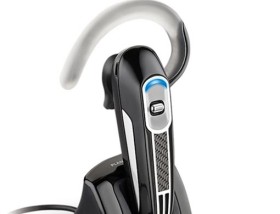
– Plantronics Discovery 665: A small and very light (only 9 gm) headset. A single charge gives up to 3.5 hours of talk time. Discovery comes with technology that automatically optimises audio levels for both caller and receiver. Needless to say all this comes at a price. The Discovery 665 will set you back about Dh350.
– Plantronics Voyager 520: Launched recently in the UAE market, it’s a robust headset that delivers good sound quality. You could expect a commendable seven to eight hours of talk time. It’s a simple model with an ear loop that will appeal to people who fear the set falling down. The Plantronics Voyager 520 weighs 16 gm and costs around Dh275.
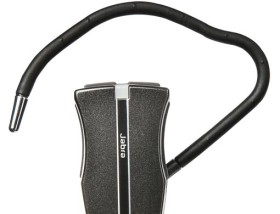
– Jabra JX10: This looks similar to Nokia BH-210 and weighs the same at around 10 gm. The talk time goes up to six hours. Price-wise it may be a little on the higher side at Dh265 but boasts good sound quality and an appealing style.
– Nokia BH-210: The features of this Bluetooth headset are more or less the same as the Jabra JX10. The sound quality may not be as good as Jabra but it is still pretty decent. You can own it for Dh140.
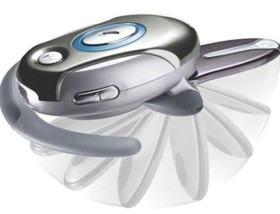
– Motorola H700: This again is a good looking headset that delivers good sound quality as well. It weighs 14 gm and has a talk time of up to six hours. H700 also has a folding microphone that turns the headset on and off. At Dh125 it’s a pretty good bargain.
– The prices mentioned above could vary from shop to shop.
Remember it’s all about ease of use; you could get a Bluetooth headset for as low as Dh50 but you may not be able to use it for long due to poor quality. I personally use the Plantronics Discovery and have no regrets whatsoever!
– The writer is a tecch guru who runs a trading
company in Dubai.
Disclaimer: The opinions and ideas expressed here are those of the author and in no way reflect the views of Notes on any technology.
Japanese company creates eco-friendly car that uses water as fuel!
Japanese company creates eco-friendly car that uses water as fuel!Tuesday June 17 2008 14:51 IST ANI
WASHINGTON: Japanese company, Genepax has claimed that it has created a new eco-friendly car that can run on nothing but water.
The company said that a proprietary unit, a type of membrane electrode assembly (MEA), breaks water apart into hydrogen and oxygen using a chemical reaction, which provides fuel for a hydrogen fuel cell to run the car.
Genepax said that power is generated by its Water Energy System (WES) by supplying water and air to the fuel and air electrodes, the system being similar to that of a standard fuel cell.
While the company did not disclose much, its president claimed that they had “succeeded in adopting a well-known process to produce hydrogen from water to the MEA”, Environmental News Network reported.
He also said that the mechanism was similar to the method in which hydrogen is produced by a reaction of metal hydride and water.
But, Genepax insists that the new process produces hydrogen from water for a longer time than the existing method.
The company uncovered a fuel cell stack with a rated output of 120W and a fuel cell system with a rated output of 300W. The 300W system is an active system, which supplies water and air with a pump.
While showcasing the cell system, they successfully powered the TV and the lighting equipment with a lead-acid battery charged by using the system.
And then, they mounted the 300W system in the luggage room of a compact electric vehicle “Reva” manufactured by Takeoka Mini Car Products Co Ltd, and the vehicle was successfully driven by the system.
Now, Genepax is planning to provide 1kw-class generation systems for use in electric vehicles and for residential applications.
While the current production cost is about 18,522 US Dollars, it is estimated to be reduced to 5000 US Dollars and even lower if the company succeeds in mass production.
Digicam: Perfect those candid shots!
Digicam: Perfect those candid shots!
TIMES OF INDIA/IANS
Love taking extempore pictures? Pictures without those model-like poses. In fact, many people start out in digital photography taking ‘candids’ — pictures of people in their environment when they are not posing.
However, unfortunately, most of those pictures end up being rejects — unflattering or just plain uninteresting. But the good thing in digital photography is that there’s no penalty for trying. It costs nothing to download the pictures on to your PC and view your results, and you are not compelled to print out anything that’s not worthy.
The trick, however, is to hone the art of shooting candids. Here are some simple techniques that will help you improve your candid pictures.
Get the context right
When you’re shooting people in unposed situations, it’s easy to get tunnel vision, concentrating solely on your subject. But an interesting picture consists of more than just your subject.
It’s a combination of subject and context – and that context includes what’s behind and around your subject. If in your photograph you unintentionally capture distracting or unattractive poles, concrete, or people engaged in distracting activities, the impact of your photo will be diminished.
Go for natural surroundings
Try for uncluttered, natural backgrounds, if possible, or make sure that any people behind or around your subject are part of the story that your picture is telling.
Sure, posing goes altogether against the idea of candids. But the fact is that getting people in the mood to be photographed and in the right environment for a compelling shot often results in photographs that we end up keeping around – and that, after all, is usually the point of taking pictures in the first place.
Focus on eyes!
A rule of thumb in all people photography is always to focus on the subject’s eyes, since that is the natural focal point of the viewer. If your subject’s eyes are out of focus, the entire photograph will be perceived as “off”.
So use the focus point selector on your digital camera to ensure that the main subject’s eyes are where you focus. The only exception to this rule would be if you’re intentionally trying to achieve a special effect through a less conventional method of focus.
Shoot unusual angles
Saying something like, “hey, would you mind moving over here so that I can take your picture” is not that hard, and people often respond favourably, giving you the type of shot that you want.
To make any candid pictures of people more interesting, try shooting them from unusual angles. Instead of shooting people always at eye level, see what happens in your viewfinder when you move to the left or right, crouch down, or stand on a stool.
Try to get your subjects looking up at you a bit rather than straight on. This is especially effective for older people. With children, on the other hand, get down on their level rather than shooting them from above.
Taking a picture of a toddler amid a sea of adult legs can be effective – and draw out an expression from the toddler that’s special.
Lighting does matter
Even if you’re a very experienced photographer, you won’t gain any friends if you show them candids of themselves that aren’t flattering. So don’t spare the delete key.
Lighting is critical to any good photograph, and that includes candids. Try to get your subjects in light that is flattering to them. Harsh sunlight that makes your subjects squint isn’t the best, nor is taking a picture of someone when the sun is at that person’s back, since your camera will be overwhelmed by the light from the back and your subject will end up looking dark.
To compensate for difficult lighting situations, consider using your camera’s built in flash – or an accessory flash – even when you’re outdoor. Flash will fill in any shadows in an unevenly lit scene, and it will enable your camera to better adjust the colours in a scene, which will result in more pleasing skin tones.
Not mouthful please!
With your digital camera in hand, you’ll no doubt be tempted before long to take pictures of people while they’re eating. Casual get-togethers, company events, sporting events, and other situations in which candids are commonly shot often involve food – and new photographers are tempted to snap those pictures when their subjects are chomping down on something tasty.
Avoid that temptation. The reason is simple: people are often in unflattering positions when they’re eating, and they’re generally not in a mood to be photographed then.
They’ll be concerned that they have food on their chin or hanging out of their mouths – and in the worst cases, they actually will. Unless you’re photographing a bride and groom sharing a ceremonial piece of wedding cake, let people eat without the flash bulbs going off.
Courtesy: IANS
How to cool your PC!
How to cool your PC!
Times of India/IANS
Computers hate heat. So this summer, be sure to think about keeping your computer cool. Computer components themselves run hot, and yet they’re not designed to operate above a certain temperature.
When the temperature outside gets uncomfortable for humans, you can be sure that your computer isn’t liking the situation any better. So for a trouble-free summer of computing, take steps now to ensure that your PC stays cool.
Clean the fan!
In a sense, fans are a computer’s most important component. Without them, your computer’s processor, memory, and other vital parts would overheat and eventually fail or cause your computer to slow down or to start behaving erratically.
So at least once a year – and the beginning of summer is a good time – you should inspect the fans in your computer to ensure that they’re operating, and you should also clean them, for all fans collect dust and function less efficiently as a result.
Notebook computers typically have a fan that vents to the back or side of the computer. The fan generally kicks in periodically, when the computer is doing lots of work or when the temperature outside is high.
Desktop computers often have several fans: one or more on the back of the PC that vents to the outside, one inside the computer on the central processing unit (CPU), and often one on the graphics card.
Each of the fans on your computer should be vacuumed out and cleaned. Turn the computer off, vacuum, and then use cotton swabs moistened in water to clean the fins. Also, make sure the fans are still functioning.
With desktops, turn the computer on while the case is removed, and see whether the fans spin up. With a notebook, listen closely to determine whether the fans spin up from time to time. If any fans are no longer functioning, have the computer repaired before continuing to use it.
Avoid overclocking!
Overclocking is the term used to describe attempts to run computer components at higher voltages or speeds than they were designed to support.
In many modern computers, the basic input output system (BIOS) – typically accessible by pressing Del or F2 when your compute r boots up – contains settings that allow enthusiasts or experimenters to overclock the CPU, memory and graphics card.
Unless you know what you’re doing and have taken steps specifically to provide extra cooling to your computer, avoid the temptation to overclock. If your cooling fails, your components will overheat much faster than otherwise – and may even be damaged permanently.
Give your PC the right seat!
Where you place your computer is important when it comes to keeping your computer cool. Place desktop computers on the floor, if possible, since it’s cooler down there – and move them close to an air conditioning vent, too, if one is available. Do not place them close to other heat-generating devices.
With notebook computers, there’s often less choice about where to place them, but try to keep them off your lap, which will make both you and your computer less comfortable.
Switch off, when not using!
“Always on” computing is great in principle, but computers that stay on constantly in the summer are more susceptible to failure, if the heat rises or cooling fails. So turning your computer off when you’re not using it will save not only electricity but potentially your PC as well.
Monitors, too, generate a lot of heat when turned on – even when they’re not displaying an image. Just put your hand near the back of your monitor – CRT or LCD – to find out. Get into the habit of turning off your monitor when you step away from the computer for extended periods of time.
Cool utilities
These days, many computers come with software programmes that allow you to monitor the temperature of your computer. These utilities can also come handy.
As even if you don’t know what temperature is considered acceptable, the utilities will display warning signs when components of your PC get too hot.
Now, the Magic Wheel for smooth ride to office
Now, the Magic Wheel for smooth ride to office
Saturday June 7 2008 17:44 IST ANI
LONDON: Going to work will now be made easy with the portable “Magic Wheel,” as it will not only provide relief from those long irritating hours spent in heavy traffic, but will also be eco-friendly.
This black and red wheeler is lightweight and businessmen can easily carry it on the train or into the office.
The machine consists of one large 26-inch wheel and a smaller, stabilising wheel behind, and can take riders weighing up to 19 stone. It is a sort of modified bicycle without a saddle or handlebars.
The rider has to place one foot on a platform on one side of the wheel and push himself using the other foot in a scooter-like fashion. After attaining momentum, riders can easily bring the pushing foot up with the other foot.
Created by Soma Ungar, a Hungarian inventor, the Magic Wheel is being distributed in the UK by Northamptonshire based firm Parker and Johnston. And is available online for 80 pounds.
“The Magic Wheel was originally aimed at commuters travelling to work. It’s perfect for living somewhere like London where so many people travel to work on the train. Once you have mastered it, it’s also great for weaving through crowds of people,” The Telegraph quoted Kevin Johnston, 29, of Parker and Johnston, as saying.
For a smooth ride, one has to practice on the Magic Wheel for around two hours.
Mr Johnston added that the machine was not only ideal for businessmen, but also the skateboarding fraternity.
“At first it is not that easy but once you do get the hang of it, it becomes like riding a bike – you never lose it. The average user takes a couple of hours practice before they can comfortably ride the Magic Wheel with both feet on the board.
“We have found that it’s actually much easier the faster you go. We have had plenty of interest in the wheel in the UK but I think that once it starts to be spotted on the streets it will really take off. It’s ideal for businessmen on the go but it’s also proving popular among teenagers who are into skateboarding.”
Revving up on an engineering model
Revving up on an engineering model
Thursday June 12 2008 10:38 IST Siri Srinivas for Express News Service Bangalore
THE students of RV College of Engineering (RVCE) unveiled a prototype of a hybrid vehicle which uses both electric and bio-diesel mechanisms. Project Chimera is an environment friendly biodiesel-electric hybrid vehicle based on the electric car Reva.
The project, handled by the final year students of RVCE, culminated in a ceremony presided over by industry big-shots such as Mohandas Pai, member of board, Infosys, Chetan Maini, chairman of the Reva Electric Car Company, Gowrishankar Hosakere, manager R&D, National Instruments, and Friedel Pickard, MD of Bosch E&S.
The prototype, intended to bridge the gap between electric cars and gasoline-driven models, was entirely developed by the Project Chimera team; backed by RECC, Bosch, and National Instruments.
“It is an indigenously developed vehicle,” a proud Karthik Bhaskaran, team leader of Project Chimera, said.
The car runs on a Lambordini diesel engine and a motor acquired from Agni motors in Gujarat. The hybrid provides a mileage of about 40 kms per litre and can attain a maximum speed of 90 kmph.
To accommodate the diesel engine, the engineers added an additional load of 70 kgs at the front thereby making it a vehicle for two passengers from the original capacity of four of the Reva. Another interesting design aspect of the car is that it has the feature of on-board charging and does not necessarily need an external power socket.
This is due to the presence of a supplementary power source. The use of a bio-diesel blend facilitates the reduction of harmful sulphur emissions to a great degree.
The members of the project, who come from Mechanical, Electrical, Industrial and Computer Science streams, teamed up to work on the planning and development of the model.
They designed and fabricated a separate bed to house the system and programmed the motor controllers as well as the hybrid controllers which form the brain of the car.
“Chimera is a mythical creature with the head of a lion, the body of a goat and the tail of a serpent. It’s a hybrid in itself and so the name,” explain team members Arun Nedungadi and Siddhartha Saraogi.
Mohandas Pai welcomed this partnership of industry and academia and emphasised the need for innovation. Chetan Maini urged more students to think out of the box, as the enterprising team had, and spoke of the importance of nurturing engineering talent in the country.
Pickard lauded the project by saying, “Success stories don’t just happen, they’re made.”
The senior students of RVCE, who will be graduating this year to better things, were optimistic that their successors would give the project new dimensions.
“This can now be made into a fuel-solar hybrid vehicle or even further improved upon. The possibilities are endless,” says Arun.
While a certain industry big-wig not so discreetly expressed his displeasure with the new airport’s infrastructure to a fellow corporate head before the event, the buzz clearly pointed at the industry’s hope and interest in tapping young engineering talent.
UK to give waterless washing machine a spin
UK to give waterless washing machine a spin
9 Jun 2008, 1526 hrs IST,REUTERS
Xeros Ltd, which has been spun out of the University of Leeds to commercialise the technology, said on Monday the new machines would use less than 2 per cent of the water and energy of a conventional washing machine.
Plastic chips are used to remove dirt and stains from clothes, leaving them dry and reducing energy consumption as there is no need to use a dryer after the washing cycle, Xeros said in a statement.
The firm, which recently secured investment of almost 500,000 pounds ($984,400) from IP Group Plc, said that the price of the new machines was “not expected to be dramatically different from (conventional) washing machines.”
Washing machine usage has risen by 23 per cent in the past 15 years. The average UK household uses almost 21 litres of water daily on clothes washing, 13 per cent of daily household water consumption, according to Waterwise, a non-government organisation focused on decreasing water wastage in Britain.
A typical washing machine uses about 35 kilograms of water for every kilogram of clothes, in addition to the power needed to heat the water and dry the clothes
There are more than two million washing machines sold in Britain annually, with a value of about 1 billion pounds, Xeros said.
- ← Previous
- 1
- 2
- 3
- …
- 5
- Next →
 ClicksandWrites
You must be logged in to post a comment.